What are Captures?
A capture is any piece of information you feed into rivo. It could be meeting notes you type after a call, a voice memo recorded on your phone, a pasted email thread, or a document you upload. rivo takes that raw input and automatically extracts structured data: who was mentioned, what was discussed, any tasks or deadlines, dollar amounts, decisions, and more.
Captures are the input, Connections are the output. Every fact, task, and relationship in rivo traces back to one or more captures. The more you capture, the smarter rivo gets about your world.
Creating a capture
Tap the + New Capture button (desktop sidebar) or the blue + button (mobile bottom nav) to open the capture form.
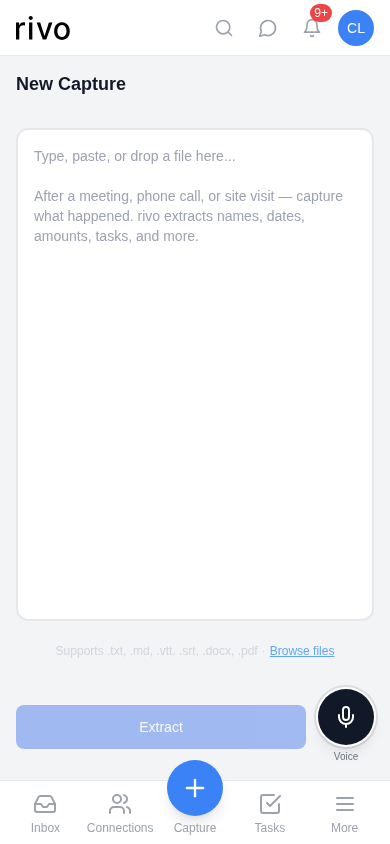
- Type or paste your content into the text area. Meeting notes, call summaries, email threads, pasted transcripts — anything goes.
- Or upload a file — tap "Browse files" to upload a .txt, .md, .vtt, .srt, .docx, or .pdf document. Transcripts from Zoom, Otter, and other tools work great.
- Or use voice — tap the microphone button to dictate your notes. Great for quick captures right after a call or meeting.
- Tap "Extract" — rivo processes your input and extracts people, companies, projects, tasks, facts, and sentiment. This usually takes a few seconds.
Pro tip: Don't worry about formatting. rivo handles messy, stream-of-consciousness notes just as well as structured bullet points. Write naturally — the extraction engine is built to understand real-world language.
All the ways to capture
Type or paste
Write meeting notes, paste email threads, drop in chat logs. The most common method.
Voice memo
Tap the mic button and talk. rivo transcribes and extracts in one step. Perfect for on-the-go captures.
File upload
Upload .txt, .md, .vtt, .srt, .docx, or .pdf files. Great for Zoom transcripts and existing documents.
Email forwarding
Forward or CC emails to your personal rivo capture address. The email becomes a capture automatically.
CSV import
Import a list of contacts from a spreadsheet. Upload a CSV, preview the mapping, and confirm.
Email capture setup
Every rivo account gets a unique capture email address. Find it in Settings and copy it. Then:
- Forward important emails to your capture address. The email subject becomes the capture title, and the body is processed for extraction.
- Or CC your capture address on outgoing emails. rivo processes the thread without you needing to forward separately.
- Email threads are grouped automatically. If multiple emails in the same thread are captured, rivo links them together so you see the full conversation history.
Noise is filtered automatically. Auto-replies, out-of-office messages, calendar invites, and marketing emails with unsubscribe links are silently discarded so your captures stay clean.
What gets extracted
When you create a capture, rivo analyzes the text and pulls out structured data. Here's what it looks for:
| Extracted | Example | Where it appears |
|---|---|---|
| People | "Met with Lisa Park from Alex Consulting" | Connections → People |
| Companies | "...from Alex Consulting" | Connections → Companies |
| Projects | "Discussed the Westbrook Website Redesign" | Connections → Projects |
| Tasks | "Need to send the proposal by Friday" | Tasks page + Inbox |
| Facts | "Budget is $45,000 over 8 weeks" | Entity detail → Details |
| Sentiment | "Jennifer seemed frustrated about delays" | Inbox sentiment alerts |
| Relationships | "Lisa works for Alex Consulting on the Westbrook project" | Entity detail → Relationships |
Facts update over time. If you captured "Budget is $45,000" last month and now capture "Budget revised to $52,000," rivo recognizes this as an update and supersedes the old fact. You always see the latest information.
Reviewing & managing captures
The Captures page shows all your captures with two views:
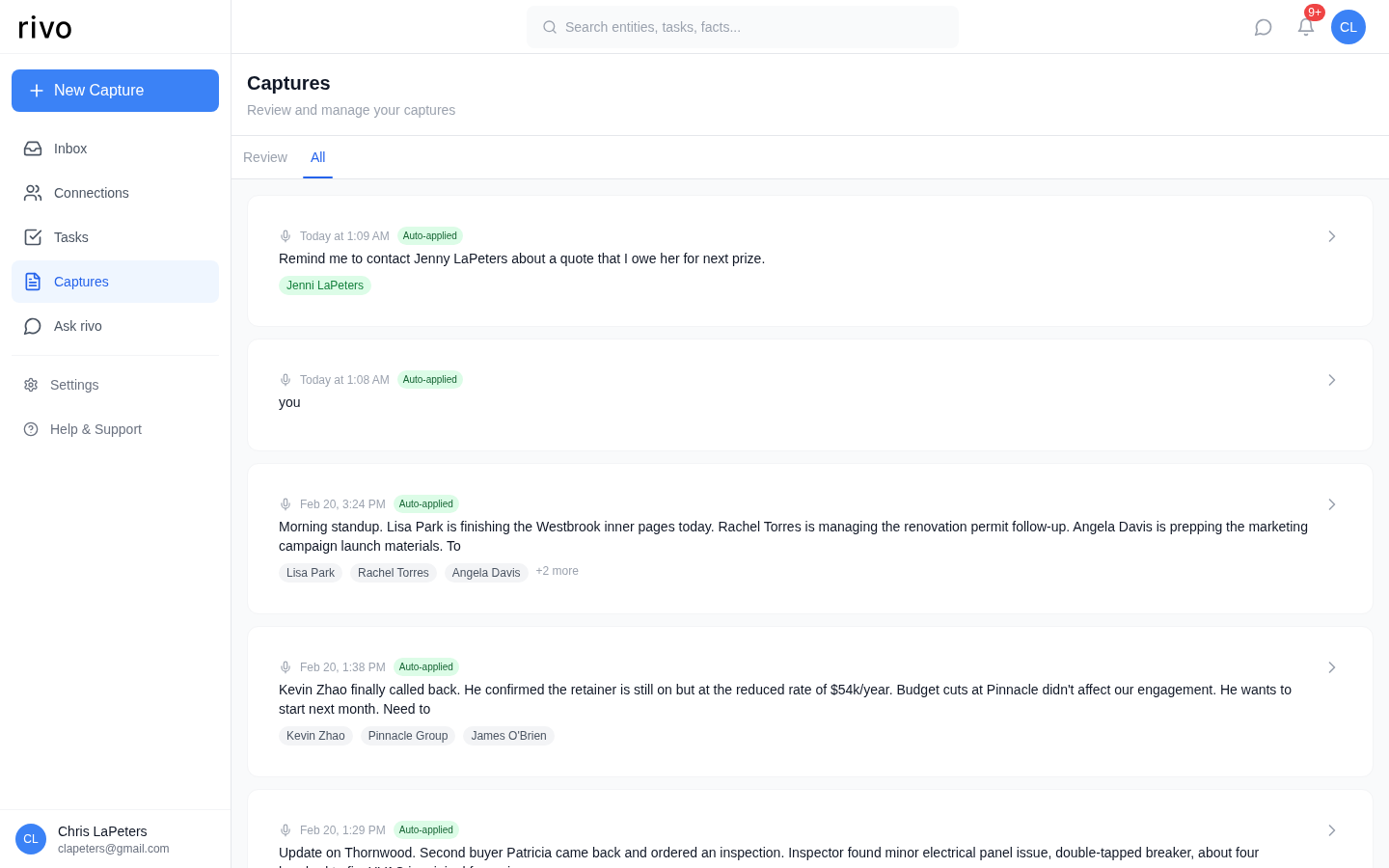
Review vs. All
Review tab
Shows captures that need your attention — newly extracted data you haven't confirmed, pending entity matches, or captures with low-confidence extraction.
All tab
Your complete capture history in reverse chronological order. Every capture with its timestamp, text preview, and linked entity tags.
What you see on each capture card
- 1 Timestamp — When the capture was created (or when the email was sent, for email captures).
- 2 Status badge — "Auto-applied" means extraction ran and data was automatically linked. "Needs review" means something requires your confirmation.
- 3 Content preview — The first few lines of the capture text.
- 4 Entity tags — The people, companies, and projects that were identified in this capture. Tap any tag to jump to that connection.
Pro tips for better extraction
Capture right after meetings. The sooner you capture, the more detail you'll remember. Even rough notes work — "Called Jennifer, she approved the e-commerce add-on, budget now $52k, launch date March 15" gives rivo plenty to work with.
Include specific numbers and dates. "Budget is $45,000" and "deadline is March 15" are extracted as structured facts that rivo can track over time. Vague references like "it costs a lot" or "due soon" are harder to extract.
Mention people with context. "Lisa Park, the designer at Alex Consulting" helps rivo link to the right person and establish the relationship. First mentions with role and company are ideal; subsequent mentions can just use the first name.
Use action language for tasks. "Need to send the proposal by Friday" or "Follow up with Kevin next week" are clearly actionable and get extracted as tasks with due dates. "We talked about the proposal" is a fact, not a task.
Capture the emotional context. Notes like "Jennifer seemed excited about the new direction" or "Kevin was distracted, mentioned budget pressure" help rivo track relationship sentiment. This powers the sentiment alerts in your Inbox.
Good capture vs. weak capture
| Strong capture | Weak capture |
|---|---|
| "Called Jennifer Westbrook at Westbrook Industries. She approved the e-commerce add-on. Budget revised from $45k to $52k. Lisa Park needs to finish inner page templates by Thursday. Jennifer seemed excited about the new direction. Launch target: March 15." | "Talked to J about the website. She liked it. Budget went up. Lisa needs to do some stuff." |
Both work, but the first gives rivo dramatically more to extract: full names, a company, a project update, a budget change (supersedes old data), a task with a deadline, sentiment, and a milestone date.