How the Inbox works
The Inbox is the first thing you see when you open rivo. It's not a notification feed or a message list — it's a prioritized action list built automatically from your captures.
Every time you create a capture, rivo extracts tasks, deadlines, and sentiment. The Inbox organizes all of that into sections, ordered by urgency. The most critical items are always at the top.
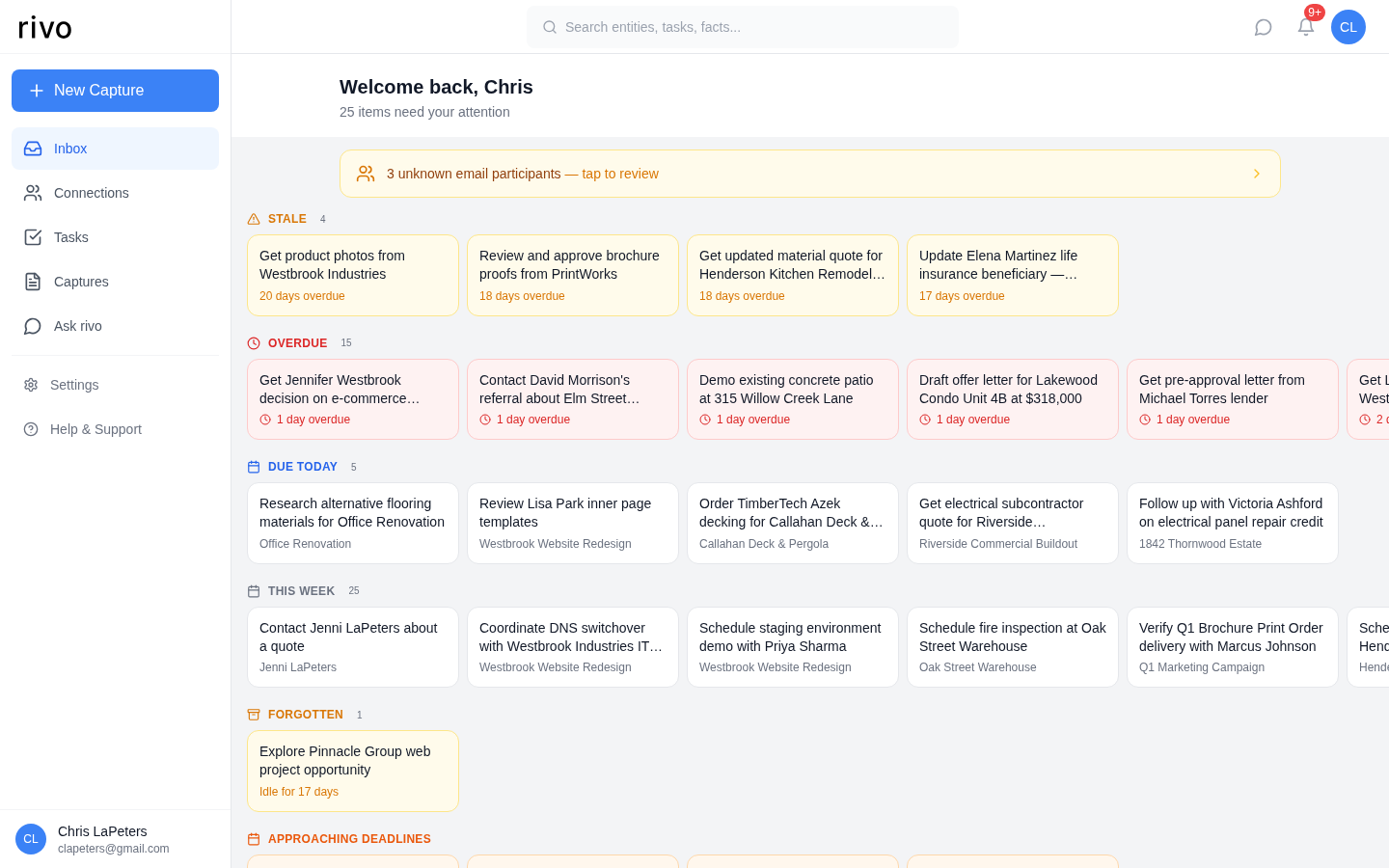
The Inbox is zero-maintenance. You never need to add items to it. Tasks, deadlines, and sentiment alerts appear automatically from your captures. Just open rivo each morning and start at the top.
Inbox sections
Items are grouped into sections, displayed in priority order from top to bottom:
| Section | What it shows | Why it matters |
|---|---|---|
| Sentiment Shifts | Connections whose sentiment is declining or volatile across recent captures | Catch relationship problems early, before they become crises |
| Stale | Tasks with no activity for 14+ days | Things you may have forgotten about — decide to act or close |
| Overdue | Tasks past their due date | These need immediate attention or rescheduling |
| Due Today | Tasks due today | Your must-do list for the day |
| This Week | Tasks due within the next 7 days | Plan ahead — what's coming up soon |
| Forgotten | Tasks idle for an extended period with no due date | Items that slipped through the cracks |
| Approaching Deadlines | Tasks due within the next 2 weeks | Get ahead of upcoming deadlines |
| Recent Captures | Your latest captures for quick reference | Verify extraction was accurate |
Sentiment alerts
rivo tracks the emotional tone of every capture. When it detects a pattern — a client who's been increasingly frustrated, or a contact whose engagement is erratic — it surfaces a sentiment alert at the top of your Inbox.
What triggers an alert
Declining
Sentiment dropped 5+ points over recent captures. A relationship that was positive is trending negative.
Volatile
Sentiment swings of 8+ points. The relationship is unpredictable — hot one day, cold the next.
Only "needs attention" alerts appear. rivo doesn't alert you when things are going well — the Inbox is purely for items that need action. Positive trends are visible on each connection's detail page.
Dismissing alerts
Once you've addressed a sentiment concern (or decided it's not actionable), dismiss the alert. It won't reappear unless new capture data triggers a fresh alert.
Your daily workflow
- Open rivo first thing. The Inbox loads automatically as your home screen.
- Scan sentiment alerts (if any). These are your most urgent relationship signals — consider a quick check-in call.
- Handle overdue items. Either complete them, reschedule, or snooze if they can wait.
- Review "Due Today." This is your must-do list. Tap any task to see its full context and the capture it came from.
- Glance at "This Week" to plan ahead. No surprises later.
- After each call or meeting, create a new capture. Tomorrow's Inbox will be even more useful.
Pro tips
Don't ignore "Stale" and "Forgotten." These are the items most likely to slip through the cracks. If a task has been sitting for 14 days with no movement, it either needs action or should be closed.
Use snooze strategically. If something is overdue but you can't act until next week, snooze it. It disappears from the Inbox until the snooze date, then reappears automatically.
Include deadlines in your captures. "Need to send the proposal by Friday" creates a task with a due date. Without a date, tasks can only appear in "Forgotten" — they won't show up in "Due Today" or "Overdue."
Pending email contacts. If rivo detects new people in forwarded emails that aren't in your Connections yet, you'll see a banner at the top of the Inbox. Tap to review and confirm them.